Dalet Flex documentation has moved!
This page is no longer actively maintained. For the latest documentation, please visit us at our new support portal: https://support.dalet.com
External API Backing Store
The External API Backing Store enables users to populate a drop down (single or multi-value fields) in the Metadata Designer with data from an external API.
In order to use the External API Backing Store functionality, the Dalet Flex team must carry out some custom development. The Dalet Flex team must create a custom service that acts as converter between the clients external data format and Dalet’s standard data format.
Once this custom development has been carried out, you can use the External API Backing Store functionality by following these steps:
-
Open a metadata definition and create a single or multi-value field.

-
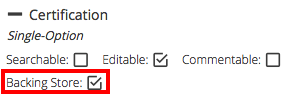
In the configuration panel, select the Backing Store check box.
-
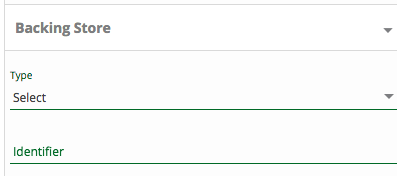
Expand the Backing Store drop down.
-
From the Type drop down, select External API.

-
In the Identifier field, enter the name of an Dalet Flex customer specific service. This name will be registered in Consul.

You must enter the name of a Dalet Flex customer specific service exactly as it is registered in Consul, followed by a colon, and then an ID. E.g.: service-name:key
When Dalet Flex requires values, it calls the Dalet Flex customer specific service, passing in the ID provided in the Metadata Designer, which in turn makes a call to the target external API, converting the data where necessary.