Dalet Flex documentation has moved!
This page is no longer actively maintained. For the latest documentation, please visit us at our new support portal: https://support.dalet.com
Job Life Cycle
Job life cycle status
The diagram below shows the possible statuses during the life cycle of a job. These are returned by the action executor as the workflow progresses:
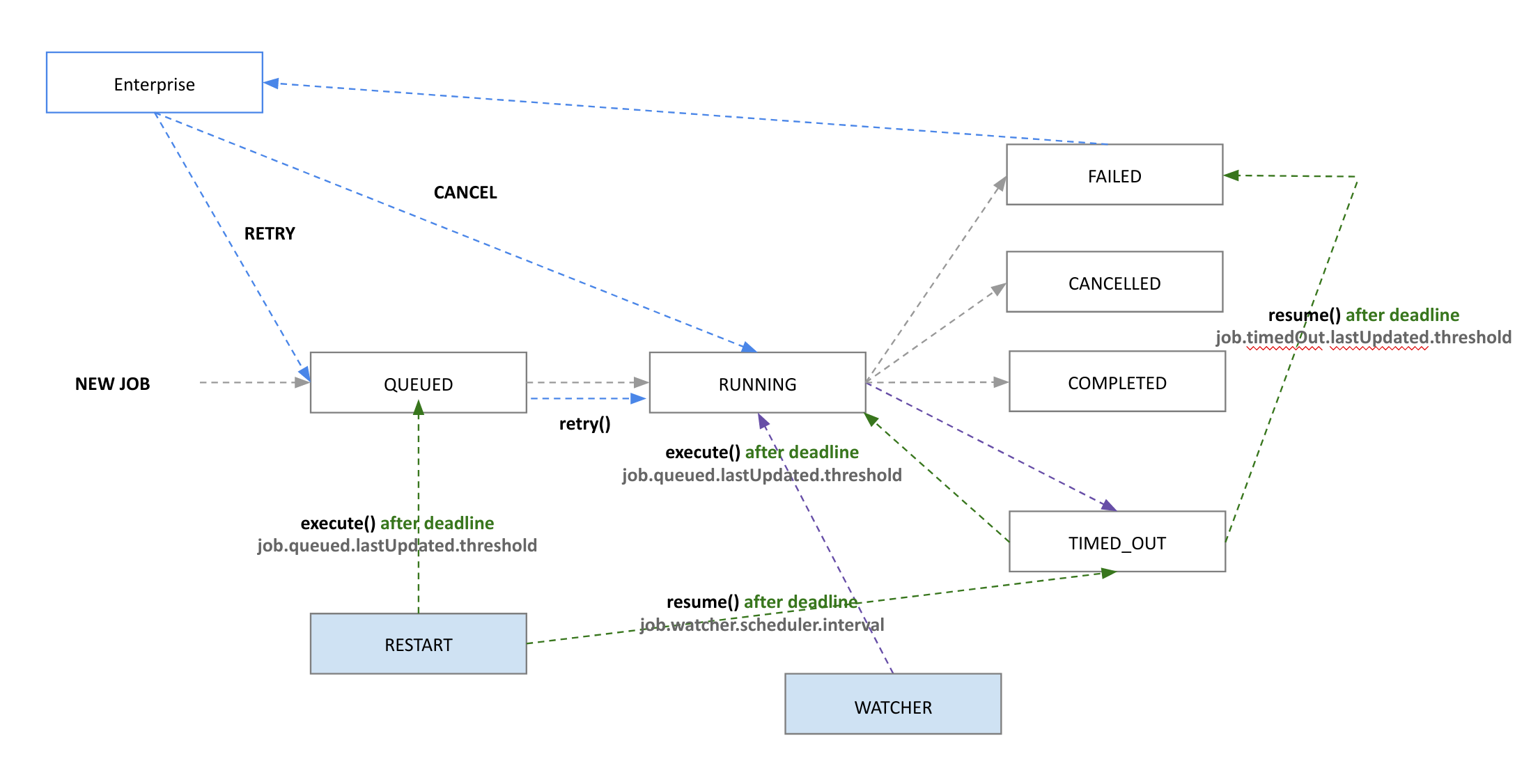
For more information please see https://github.com/dalet-oss/flex-jefexampleexecutor-service
Running
JEF sets this status when the action configuration instance is processed by the action executor.
- Developers could send action progress updates with job progress and messages anytime.
- In case of job final result it should be set as
COMPLETED,FAILED, orCANCELLEDstate.
Completed
When the execute method completes, it returns an instance of the Action Response and Dalet Flex either progresses to the next stage in the workflow, or finishes the workflow.
In the response, you can set any of the following fields:
- jobContextVariables: This contains a map of key values which are reflected under the Job Variables tab in the Dalet Flex user interface. They can be used input/output variable for the specific job life exclusive.
- workflowContextVariables: This contains a map of key values which are reflected under the Workflow Variables tab in the Dalet Flex user interface. Workflow variables are passed along as input/output throughout each of the jobs in a workflow.
When the action executor has finished processing, the status is automatically updated to “Completed” and job progress set to 100.
Failed
If an unhandled exception is thrown within the ActionExecutor.execute method, the job and/or workflow that instances the job will fail. In this case the whole stack trace with root cause will be captured.
Additionally, developers can configure messages to be returned using Action Response with FAILED status. In this case only the structured message will be shown
Job and workflow failures can be seen in the History panel in the Dalet Flex user interface.
Queued
If the request has been handled, but it has not started yet, JEF will set this to QUEUED state. Jobs are put in a QUEUED state from the point they are delivered from Enterprise, until the execute class starts execution.
Cancelled
This status is displayed if a cancellation occurs. A cancellation can occur if a job is cancelled by the job, workflow, or by the underlying services. This is internally managed by JEF, and so, no action is required by the developer.
Timed Out
Job Executors can identify jobs timing out. Jobs Executors use internal watchers for notification updates. If long running do not update over 2 deadline, they are marked as FAILED by the watchers. This is reported to Enterprise but the job will not be in a FAILED state.
TIMED_OUT jobs are candidates for other Job Executor instances to take responsibility and continue the job execution.
On restarting a Job Executor service instance all running job will be first TIMED_OUT and they will become candidate for the restarting Job Executor instance or others with execution capacity to take job execution responsibility.
Waiting For Lock
JEF requests are processed internally for available locks depending the Action configuration. If SHARED or EXCLUSIVE locks are required and the lock is not available (because another job is currently using it in Enterprise or a JEF execution), the job remains in a WAITING_FOR_LOCK state until the required job is available and the execution can proceed further.
Job life cycle status
Resuming a Job
resume(): It is possible to resume a job resume() before the second timeout deadline. The executors will call this method in the event that a job has TIMED_OUT on a first deadline but it update the execution step before the second timeout deadline.
If the isResumeSupported option is configured but resume() is not implemented, the job fails.
resume() is supported only in case of ActionExecutor.execute() method. If ExecutionStep are used there are several idempotency strategies as the job could resume from the latest ExecuteionStep (see Development Guide for ExecutionStep explanation).
Retrying a Job
retry(): Jobs can be retried (retry()). This is called on by the job executor in the event that Enterprise has retried the job.
Job executors may decide to run the execute() method immediately. It is important to consider different scenarios before executing the job.
Cancelling
As a user you can cancel a job using either the Flex Enterprise UI or REST API.
A job can be cancelled while it is in a QUEUED state in JEF. A job can also be cancelled while RUNNING in a job executor when executing a job. The developer options to cancel will be different depending if the job is using ExecutionStep or only the ActionExecutor.execute() method (see Development Guide for ExecutionStep explanation).
cancel(): The cancel() method, implementation of ‘Cancellable’ interface, is called on by the ExecutionStep based jobs if Enterprise has requested to cancel the job.
Developer can use executionService.hasCancelJobRequest(job.getRequest().getExecutionId()); during a method execution to find if the job has been cancelled after the method started.
Additionally, ExecutionStep based jobs can overwrite onCancelled. This method will be called after the job is final cancelled for any final logic that the plugin developer requires adding.