Dalet Flex documentation has moved!
This page is no longer actively maintained. For the latest documentation, please visit us at our new support portal: https://support.dalet.com
Job Details
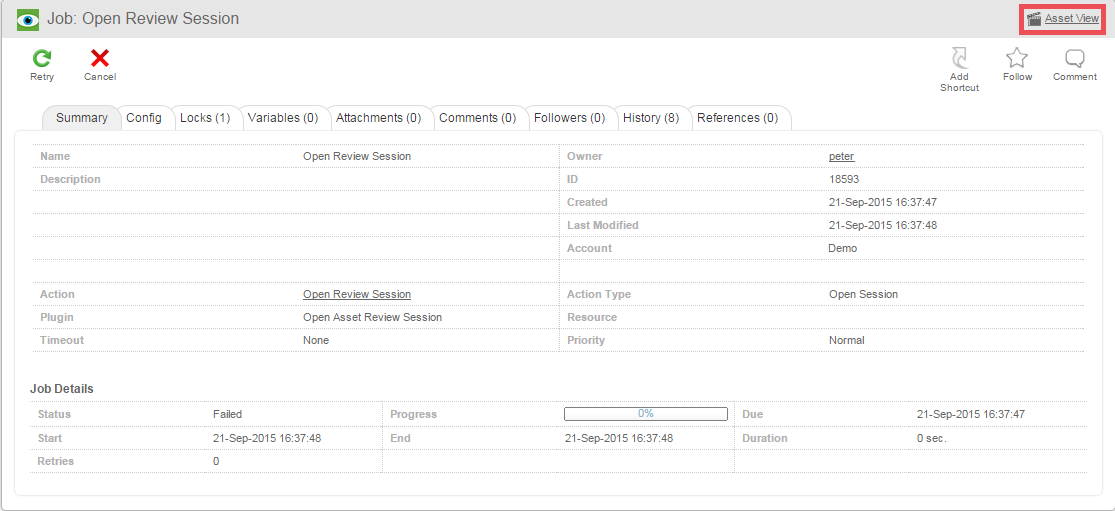
The Job Details screen displays information about an individual job or group job. The tabs and relevant fields are described below.
The asset and workflow instance linked to the job can be accessed using the link in the top right hand corner of the screen.
If you wish to watch the progress of a running job in realtime, then simply click on the History sub-tab. The view will refresh automatically to show updates as the job runs.
In the Job Details screen, you can use the sub-tab navigation to browse. Below we will focus one the job-specific tabs.
The Job Toolbar
As well as the usual Follow and Shortcut options in the Job Details view, you may also see a Retry and Cancel option. These buttons are only visible if the job has failed or timed out.
- Retry: If a job has failed or timed out, then clicking Retry will request that the job scheduler retry the failed job again.
- Cancel: If a job has failed or timed out then clicking Cancel will cause the Job to be set to “Cancelled”.
You can also delete a job that is no longer being used.